
Appearance
Managing subscriptions
Front-end
To allow users to manage their subscription(s), we need a way to authenticate them.
Craft User
If there is a Craft user signed in when the subscription is created, the plugin will save the user's ID with a subscriber automatically.
Fetching subscriptions by a logged-in user can be done using the following function, passing the currentUser as the argument
twig
{% set subscriptions = craft.mollie.getSubscriptionsByUser(currentUser) %}By e-mail
On sites that don't user Craft's users, the only way to authenticate a subscriptions owner is through their email address.
That flow works as follows:
- We have a form in which the user supplies their emailaddress
- If we have a customer of the supplied address, we'll send out an email that contains a link on which the user can manage their subscription
To give you control over this experience (both how it looks and how it is worded), you can use the following settings:
Template path for "manage subscription" email - manageSubscriptionEmailPath
Which template the plugin should use for this email. The link to manage the user's subscriptions is available in the link variable. You also have access to the full subscription element, with the custom fields you have set on it.
Subject of the "manage subscription" email - manageSubscriptionEmailSubject
The subject for the email
Route/URL to the "manage your subscription - manageSubscriptionRoute
URL where the page to manage subscriptions is located.
Form
twig
 <form method="post">
    {{ csrfInput() }}
    {{ actionInput('mollie-payments/subscription/get-link-for-customer') }}
    <div>
        <label for="email">{{ "E-mail"|t }}</label>
        <input type="email" required name="email">
    </div>
    <button type="submit">{{ "Find my subscription"|t }}</button
</form>
Overview
twig
{% set uid = craft.app.request.getParam('subscriber') %}
{% set subscriptions = craft.mollie.getSubscriptionsByUid(uid) %}

{% for subscription in subscriptions %}
    <div class="my-4">
        <form method="post">
            {{ actionInput('mollie-payments/subscription/cancel') }}
            {{ redirectInput('') }}
            {{ hiddenInput('subscription', subscription.id) }}
            {{ hiddenInput('subscriber', uid) }}

            {{ sub.interval }} - €{{ sub.amount }} - {{ sub.email }}<br>

            <button type="submit">{{ "Cancel subscription"|t }}</button>
        </form>
    </div>
{% endfor %}
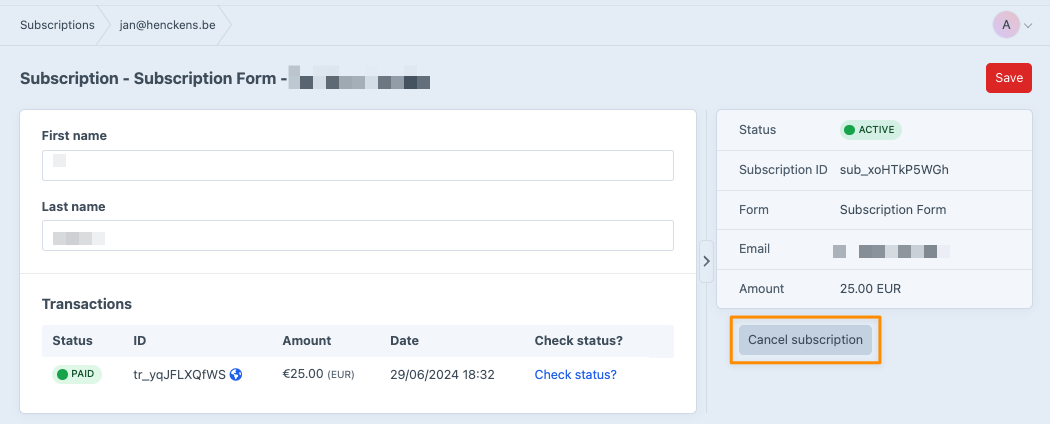
Control panel
Subscriptions can also be managed from the control panel. For active subscriptions, a button to cancel the subscrtiption will be displayed in the sidebar.
Maintenance
Two console commands repair subscriptions and transactions that a bug left in a bad state — subscriptions stuck as pending without a subscriptionId, and paid transactions without a paidAt. See Console commands.